

Update: We have launched our own guest blogging WordPress plugin – check it out!
If you plan to start accepting guest contributions or launching a new collaborating blog with several co-authors, you may want to configure your WordPress blog to make your (and your contributors’) life easier.
Let’s call it “optimize your blog for guest posting” because an SEO will never die inside me 🙂
1. Easier Notifications
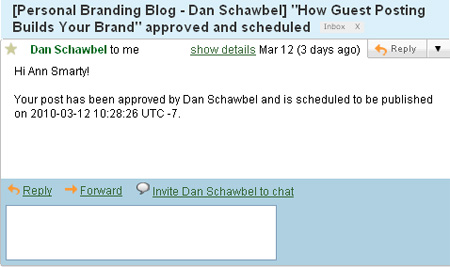
Peter’s Collaboration E-mails: This plugin makes it easier for both the blog owner and the contributor to keep updated on the guest post status:
- When a Contributor user submits an article for review: The plugin e-mails a list of approvers of your choice, letting them know that there is a post ready for review, and giving them a link to edit the post.
- When a post is approved: The Contributor user gets an e-mail saying that their post has been approved and who it was approved by. If the post was directly published, the author is given a link to read the post as the whole world sees it. If the post is scheduled to be published, the author is informed of the time that their post will go live. When the post does go live, the author will get another e-mail informing him / her of that.
- When a post’s status is changed back to “draft” from “pending”: The original Contributor user gets an e-mail saying that their post has been reverted back to a draft, along with a link to edit and re-submit the post.
A similar one: WP Status Notifier
2. Optimized Dashboard
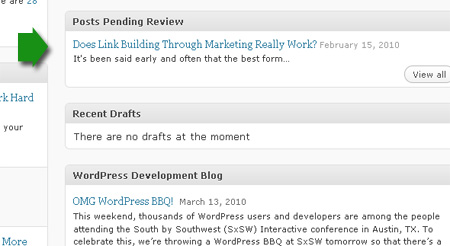
Dashboard: Pending Review: This plugin creates a new widget for that dashboard that lists out posts pending review so you can see which posts you need to check out immediately after logging in.
3. Easier Discussion
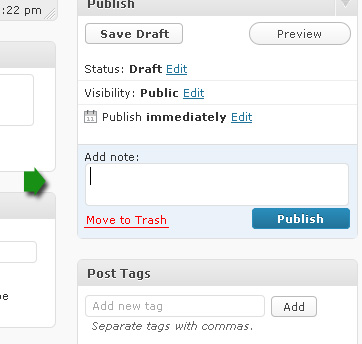
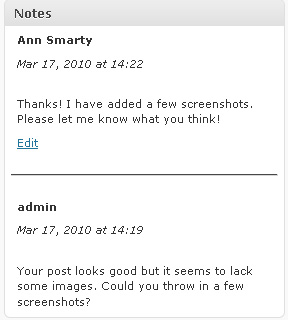
Peter’s Post Notes for WordPress: this plugin allows to post quick private notes to go with posts. It is thus a very handy collaboration tool because an approver can suggest a quick fix, the collaborator can report a status or ask for the advice etc – and the whole conversation is forever saved with the post for you to refer to it whenever you need to.
The notes can be added right to the extra panel added to the sidebar (once you save the draft or publish the post, the note is saved as well). I wish there were a separate button to save the note though.
And here’s how the conversation history looks like:
Of course, these tips will only be helpful if your content management is run by WordPress, are you aware of other ways to accept guest posts that can be applied to other blogging platforms?
Are you using any WordPress plugins to make contributing to your blog a lot easier? Please share them!

Joseph
Latest posts by Joseph (see all)
- Chatting Guest Blogging at #Pitchboxchat - December 19, 2018
- How to Collaborate on Content: Co-Create, Interview and Find Guest Bloggers! #BizapaloozaChat - December 5, 2017
- Ann Smarty Talking Influencer Marketing at #BW_Chat Twitter Chat - February 26, 2016
Kari - Be Happy
I just switched all my websites to wordpress in the last month and I'm amazed at how many plugins there are, and how they make my life so much easier. What used to take me a day to do can be done in a few minutes.
Anerok
Excellent list. Thanks so much for sharing.
Eyewebmaster
We've been developing WordPress theme and when I read this article it help me more understand about guest posting easier.
Thanks for this tips.
karabo
I am looking to have guest posting on my site but I am not sure how to get started. I suppose i can start with these plugins. Very helpful information.
Paneru
I am also trying to incorporate guest post in my blog http://www.ictblogging.com. Now my problem is solved. Thanks for sharing
Mr.Bhavesh
Thanks for information.As I am going to accept guest post on my blog,Those plugin will help me to manage my guest posts.
Kent Chen
A gazillion thanks for your post! It saves me a ton of time searching and going nuts!
Damien
Didn’t realize there were so many plug-ins available for this. Thanks for the info 🙂
Richard Cummings
I have been reviewing various guest posting methodologies for WordPress and these three plugins may definitely be useful. Many thx, Richard
Pragati
I was thinking to start a guest post section on my website. Now I have a clear idea what I need to do and how? Thank you very much for this article.
Jhon Edison Bueno Martínez
Yes, I use that plugin in my blog Peter’s Collaboration Email and notes, it’s very easy and practical. Do you know of any software or tool that let me manage Blog Guest contacts, maybe listed by categories…
Thanks,
KBC 7
Well I use these plugins in my blog for guest posting and really like easier notification and easier discussion both. Gonna use few more fr guest post. lets see how it goes and thanks a lot for this post
phppoet
hi,
I have developed a plugin Which allows any site admin to receive guest posts on their blog. It also supports paid guest posting. Admin can pay from their post editor . for more info check
http://phppoet.com/wp-guest-posting-guest-posting-plugin-for-wordpress/
This plugin is available on codecanyon.
regards
Abhishek
Nice post I am going to use these plugins on my blog and lets ee how it goes… I like and user optimized dashboard and trust me its really good. thanks a ton for this post 🙂
Mercedes - Rutina de Yoga Para Principiantes
It’s a very interesting list. I have not had the need to use. However I will be very helpful when required. Thank you for your valuable cooperation.
Andres Riaño
These 3 plugins have been of much help. Optimized especially Dashboard.
thanks
Sam Adeyinka
Thanks so much for this great review boss. it’s so helpful. I’m glad I found it! 🙂 – Sam Adeyinka
Barry
This article is a good starting point. At presence, I am planning on including guest contributors.
This will be a first, for me. I can definitely use some help. I like the three plugins; as I’d like the idea of team reviews. Does the first one do that?
I’d like to say to a contributor. “Please send the proposed article. I’ll let a team review the content. If approved by the team then I’ll publish it.”
What about giving appropriate credit to the guest writer? I’d also like to give a link back to their blog or site.
Ataur Rahman
Thanks admin,
Really, your plugin information is very nice for all newbie wordpress blogger. I follow all the steps my blog.