
 It is quite obvious that you may want to make the most of your guest post and share it with your blog readers.
But what’s the best way to do that?
The most frequently used method is to just drop a short notice at your blog linking back to your guest post inviting your readers to comment. But is there actually a better way?
Let me share the two tactics I use to announce my guest posts at my own blog:
1. Take advantage of some alternative format
This is the most time consuming but if you provide quality content and want to share it on your own blog without sacrificing on your blog quality, you should definitely consider it.
Here are a few ideas:
- Create a video how-to screencast of what you are talking in your guest post and publish it on your site;
- Create an infographic visualizing your guest post content;
- Create a slideshow giving a step-by-step overview of what you are covering in your guest post.
Here’s one example from my own experience. Back in 2008 when I wasn’t contributing to SEJ on a daily basis and most people only knew me from my own blog, I guest debuted at SearchEngineJournal.com on with the guest article called “Make the Most of SEO Competitive Research : Evaluating the Competition”.
Of course, I was pretty much excited with that and wanted to share my experience with my blog readers. I didn’t want to just mention it with the link back. I wanted to give my readers something special as well. So I created a short slideshow containing the main post key points and the screenshots and embed it to the short update on my own blog.

I thus ended up with posting to my own blog:
- Absolutely unique title and content;
- Interactive and entertaining overview of the post.
2. Take advantage of a cool WordPress plugin
There’s one cool WordPress plugin that provides you with a very easy and quick way to “cross-promote” your guest posts on your own blog.
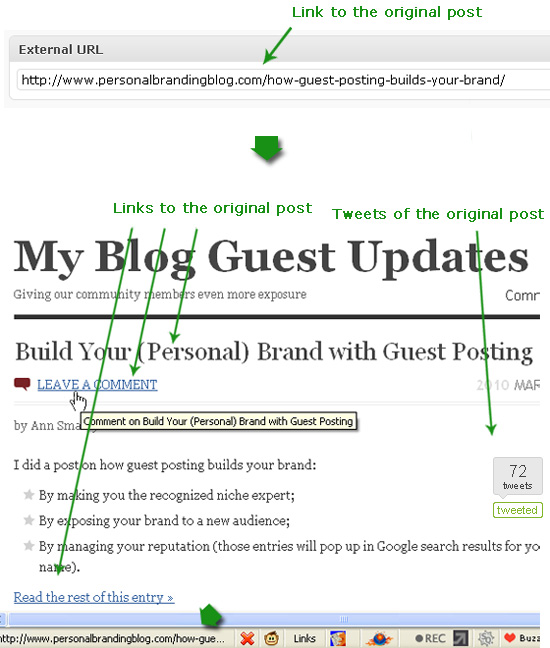
The plugin is called External Permalinks. With it you can write a short intro to your post, then provide the URL of your contribution and the plugin will:
- Display the intro on your blog;
- Link the post title and “Read more” text to the original post;
- Redirect comments to the original post;
- Display social media buttons of the original post (e.g. Tweetmeme button).
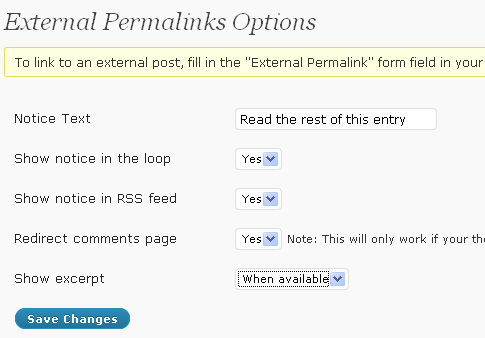
The plugin options include:
- Notice Text: If you want to, you can add a notice to tell your readers to continue reading the post at the external link.
- Show notice in the loop: Whether to show the notice on the homepage/category pages, etc.. (for each post)
- Show notice in the RSS feed: Whether to show the notice in the RSS feed (mind that the link in the RSS feed will take you to your actual guest post)
- Redirect comments page: If you want to, you can keep the comments page on your own site. Default is to redirect to the external link.
- Show only excerpts: Since you’re linking to an external site, you may decide that you only want to show an excerpt. If you haven’t added an excerpt, but still only want to show partial content, choose “Yes, always” and the plugin will automatically create an excerpt for you.
I found it to be a good way to help promote my guest posts without interfering into my normal blogging stream (if I exclude those entries from the RSS feed and/or archives).
And how do you share your guest posts with your own blog readers?
Post image by woodleywonderworks

Joseph
Latest posts by Joseph (see all)
- Chatting Guest Blogging at #Pitchboxchat - December 19, 2018
- How to Collaborate on Content: Co-Create, Interview and Find Guest Bloggers! #BizapaloozaChat - December 5, 2017
- Ann Smarty Talking Influencer Marketing at #BW_Chat Twitter Chat - February 26, 2016
Natasha Attal
Ann – Thanks for the useful information. I will start using the wordpress plugin for future guest blog posts. This is a great way to increase exposure without compromising the original content on the blog that you are a guest on.
Cori Padgett
Ann that's a great idea with the video! I honestly would never have thought of doing something that way to showcase a guest post! 😀
Thanks for the inspiration today, I love when I find new ideas for my blog. lol
Warm regards,
C
Jeff Friend
What a great idea! I never thought about actually sending my readers to my guest posts on OTHER blogs. Genius! Thank you for your contribution!
Andy @ FirstFound
That's a great plugin. I'll most definitely have a quick look.
Good advice too, I normally rely on a quick link and a few tweets to promote guest posts. Maybe I need to do more.
Coolsaint
Great idea. I wish plugin will work for me.
Geoff
Option 2 looks great. Love the way you encourage building brands through giving content… great stuff.
Graytuna
Some great stuff you shared with us, thanks a lot Ann 🙂 – Imagine if more people tried to add own unique content in their blogs to keep the discussion alive + give something unique to readers
Jeff McIntire-Strasb
I was going to throw out a question in the forums about repurposing content into video and/or slideshow format… thanks for answering before I asked!
Nevil Darukhanawala
I really liked the idea of putting up a slide show for your own blog readers with a link to the original blog post. This is not only original content (that can get links) for your own blog, it also showcases you as a prominent guest blogger to your audience.
Any such plugins for Blogger?
Генадий
Толстовка Slayer
Заказать толстовку shit happenshttp://www.vsemayk1.ru/doc/112/search/Futbolka-The-Godfather
cheap car insurance young male driverscompare cheap car insurance online fort smith
best buy car insurancehttp://www.box.net/shared/a9n6djt0mq
best buy car insurancehttp://www.box.net/shared/a9n6djt0mq
best buy car insurancehttp://www.box.net/shared/a9n6djt0mq
David Leonhardt
That's a cool plugin. Personally, I think I would prefer to keep the comments on my own page. I am not sure about the tweeting – could go either way on that one.
@awiserstartcom
Is there some kind of converter app that will grab all of your blogs from Blogger and bring them over to WP in one easy swoop?
Pete Stevens
Thanks for the ideas. Question though: By linking back to the guest post from your own site do you not devalue the links to your site from the guest blog? i.e It becomes a reciprocal link rather than one way???